Containers Demystified !!
What is a container?
Its simply a process running on the host machine. When u search for the processes in the host machine you will find the container’s application process running on the host machine.
Now there are several issue with this approach.
The first problem here is the process isolation. These are processes from different applications running on the same machine.
To provide isolation at the resource level these process are assigned namespaced slice of the different resources required. Linux namespaces are a way for the system to assign separate resources for network, userspace, pid space etc to a process.
This is the precise reason for not running pod as a root user and provide a different userid in the securitContext. Otherwise the process will have root access on the host system.
An example of such an implementation is pod. Where 2 containers in a same pod share the network ns so they can connect over localhost but they don’t share the process namespace so the process running on each one of them might be processID=1.
To see all the namespaces allocated to a process use the below commands
/proc/pid/ns
OR
lsns -p <pid>
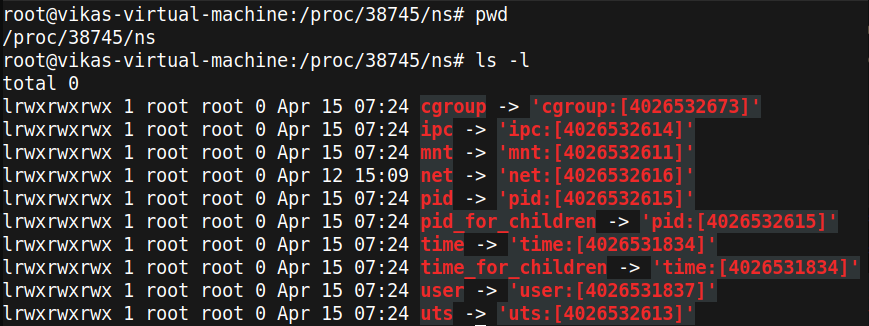
The second problem is these different process/containers should not have the complete view/access of the host file system.
This can be controlled using linux chroot.
In the below command we have given the /bin/bash command access to only specific dir. So the process bash wont be able to see anything beyond that.
Simlarly container’s process access is limited to the filesystem that comes with it. Only explicit mounting of host dir using volumes can provide access to the host filesystem.
chroot ./home/myname/rootfs /bin/bash
Third issue is what if one of the process consumes all of the CPU/ RAM and affect other process on the same host. Control groups helps here, they are a Linux mechanism to control the access to the shared resources in a linux system. There are Cgroups for all different type of resource and they are available inside /sys/fs/cgroups.
Whenever a new process is created, it is assigned a value for eg for CPU and memory. If the process consumes more that it the process will be throttled or otherwise OOM killed.

Connecting to a container process
You can use the nsenter command to enter the same namespace as the application/container process. When using containerd as container runtime you can use the below set of comamnd to connect.
ctr --namespace k8s.io containers list | grep appname   //Get container id out of it
ctr --namespace k8s.io containers info <container-id> | grep -C4 pid   // Get the process pid from here
lsns -p <pid>  // get the other pid, not the pause one
nsenter --target <other-pid> --mount --uts --net --pid /bin/bash